K/DA FIRESTARTER · DANCE TEMPLATE · 12 SECONDS
KDA Firestarter AI Dance Generator
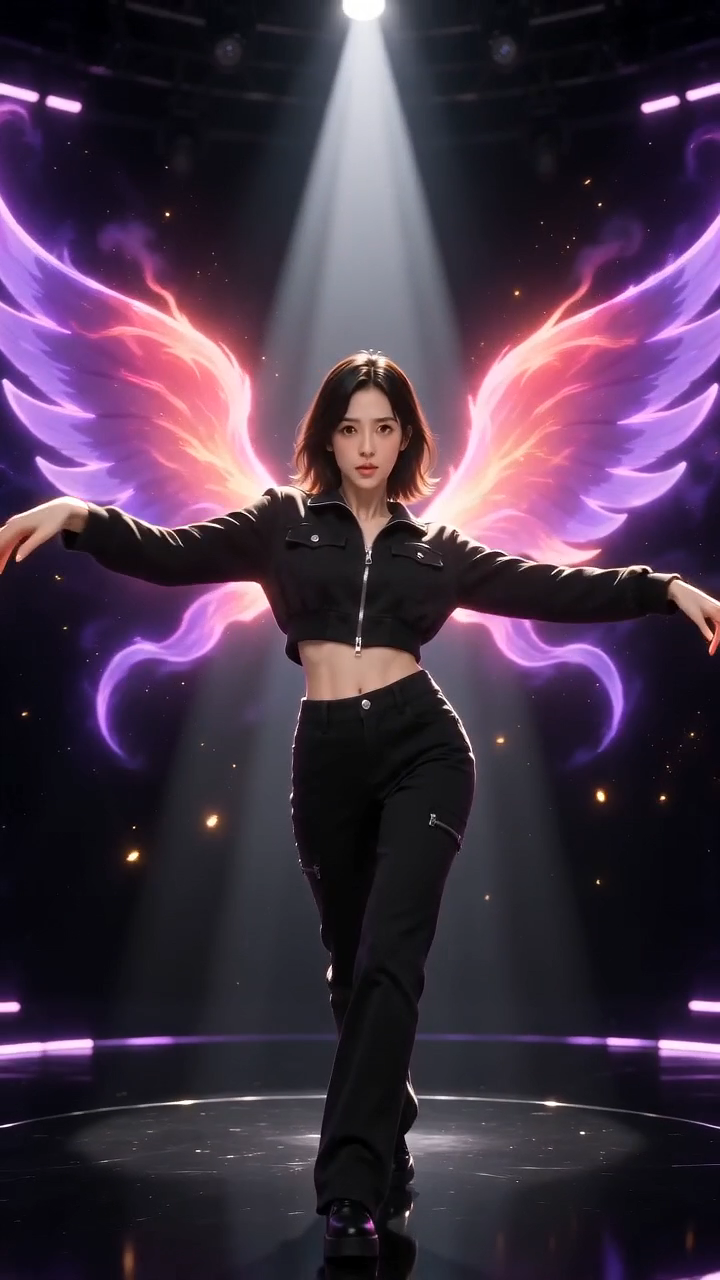
@yourstage
9:16 neon stage sample
The original song
Videos cost from 10 credits. A failed render is refunded.
Upload one avatar and make it dance to the Kai’Sa FIRESTARTER moves: voguing hand frames, sharp poses, the “Beat Drop Beat Beat Drop” hits, a fast turn and a fierce finish. No prompts, no editing.
- One avatar of an adult or an original character, no prompt needed
- 12 second video with sound, in 9:16 or 21:9
- From $6.99, no subscription
Make your KDA Firestarter dance video
Add one avatar, choose a frame and a quality, and see the price before you generate.
JPG, PNG or WebP, each side over 300 pixels. Large images are shrunk for you. A clear, front-facing face works best. A full-body photo keeps your own clothes and proportions; a headshot is extended naturally into a full body. Original character art works too if you have the rights to use it.
Frame
Quality
Worth about $5.00-$6.99 USD in credits, depending on the pack you buy. See pricing
- Pay once, no subscription. Credits never expire.
- A failed render gives your credits back automatically.
- A pack can be refunded in full only while none of its credits are used.
- 12 second MP4, ready in about 5 minutes. You sign in only when you generate.
12 second video with sound · 9:16
Sample for the 9:16 frame
Sample clip. Your video starts from your own avatar, so it will not match this one exactly.
An AI dance video with the song. Your avatar supplies the face and identity. A built-in neon-stage reference supplies the choreography, camera moves and violet-and-gold effects.
KDA Firestarter AI dance examples
Each video below started from a single photo and needed no prompt. Each was picked from a few renders made with the same settings as the generator, at the quality and credit cost shown, and results vary with the photo, so yours will not match these exactly.
9:16 neon stage sample
A generated 9:16 sample: a fictional adult avatar dances on a violet cosmic stage with gold sparks and neon ribbons.
12 seconds at 720p. 20 credits, about $5.00-$6.99 USD.
AI-generated video.
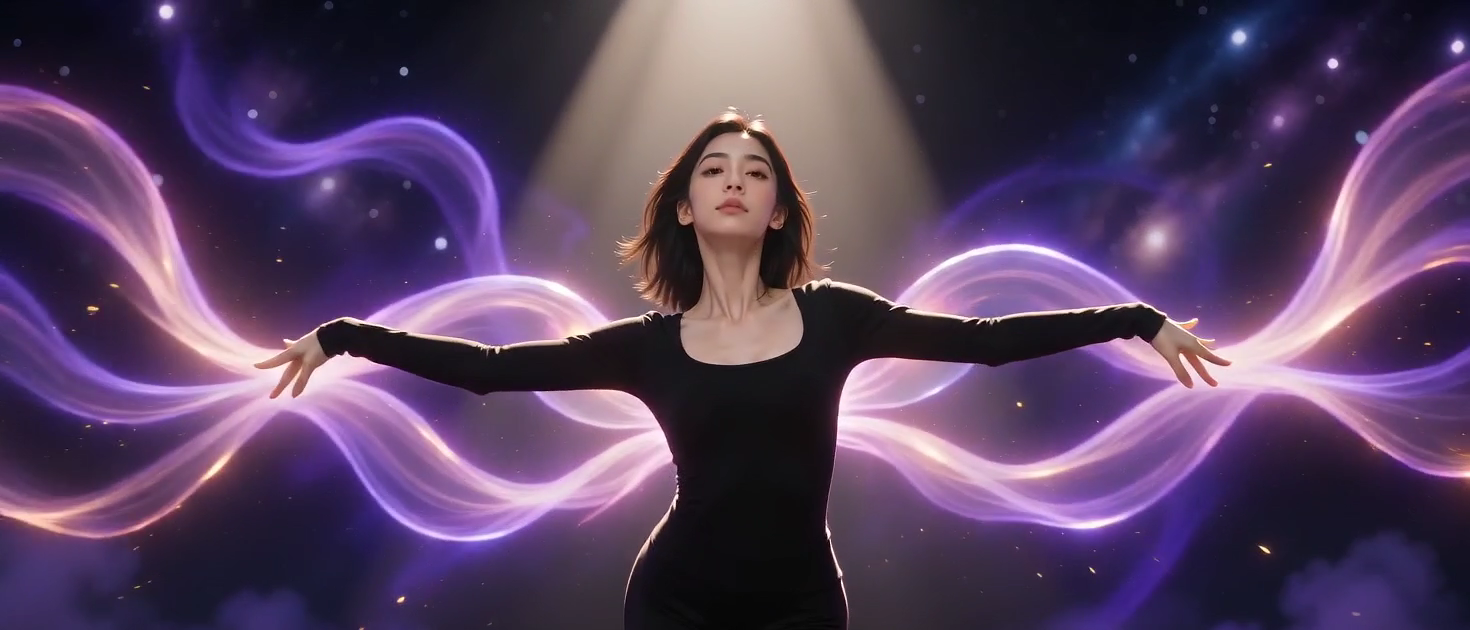
21:9 neon stage sample
A generated 21:9 sample: the same fictional adult avatar dances across a wide violet stage with neon ribbons and open space on both sides.
12 seconds at 720p. 20 credits, about $5.00-$6.99 USD.
AI-generated video.
How do you make a KDA Firestarter AI dance video?
Bring your own look
A clear face and good lighting. Upload an avatar of an adult who agreed, or of an original character you have the rights to use. A full-body photo keeps your own clothes.
Let the template lead
Choose 9:16 or 21:9 and 480p or 720p. The Firestarter dance template is built in, so there is no prompt to write and no timeline to edit.
Make it your moment
Your 12 second dance with the song is ready in about four to five minutes. Download the MP4 and post it on TikTok, Reels or Shorts.
What is the Firestarter dance?
The Firestarter dance is the K/DA FIRESTARTER routine that fans know for its voguing hand frames, sharp poses, the “Beat Drop Beat Beat Drop” hits and a dramatic dip. Kai’Sa’s solo is the inspiration for this template.
This tool brings that starting point to an avatar-to-video workflow. You pick an avatar, a frame and a quality, and the AI generates a new 12 second dance video around your subject. Your avatar supplies the face and identity; a built-in neon-stage reference supplies the moves, camera and effects.
This is an independent tool. It is not affiliated with or endorsed by Riot Games, K/DA or the artists behind FIRESTARTER, and no footage from the music video is copied into your video. The song itself remains subject to the rights of its owners.
Quick facts
- Input
- One avatar of an adult who agreed, or of an original character. The dance reference and prompt are built in; you do not upload a video or write a prompt.
- Output
- A 12 second MP4 with sound, in 9:16 vertical or 21:9 ultrawide, at 480p or 720p.
- Price
- Packs from $6.99. A 12 second video uses 10 credits at 480p or 20 credits at 720p; the recommended 720p video uses 20. No subscription.
- Time
- About 5 minutes for the recommended 12 second video, and from 4 to 5 minutes depending on quality.
- Refunds
- A failed render returns its credits automatically. A credit pack can be refunded in full within 7 days if none of its credits were used.
- Privacy
- Photos are deleted after 7 days and videos after 30 days. They are not used to train AI models.
Pay per video. No subscription.
Buy a pack once and use it whenever you like. Credits never expire.
20 credits
$6.99
from $3.50 per 12 second video in 480p$6.99 per 12 second video in 720p
Enough for 1 video of 12 seconds in 720p, or up to 2 videos of 12 seconds in 480p
- 12 second video with sound
- No watermark
- Automatic refund if a render fails
- Credits never expire
- Most popular
50 credits
$14.99$17.48
from $3.00 per 12 second video in 480p$6.00 per 12 second video in 720p · save 14%
Enough for 2 videos of 12 seconds in 720p, or up to 5 videos of 12 seconds in 480p
- 12 second video with sound
- No watermark
- Automatic refund if a render fails
- Credits never expire
120 credits
$29.99$41.94
from $2.50 per 12 second video in 480p$5.00 per 12 second video in 720p · save 28%
Enough for 6 videos of 12 seconds in 720p, or up to 12 videos of 12 seconds in 480p
- 12 second video with sound
- No watermark
- Automatic refund if a render fails
- Credits never expire
Credits and price by quality
| Length | 480p, lower detail | 720p, sharper |
|---|---|---|
| 12 seconds | 10 credits, $2.50-$3.50 about 4 min | 20 credits, $5.00-$6.99 about 5 min |
The dollar range is what those credits cost depending on the pack you buy: lowest with the largest pack, highest with the smallest. All videos have sound and both frames cost the same. 480p shows less fine detail than 720p, so faces, hands and fast turns look softer.
A video costs 10 credits (12 seconds, 480p) or 20 credits (12 seconds, 720p), in either frame. Packs are one-time purchases in US dollars (USD). A failed render is refunded to your balance automatically. A pack can be refunded in full within 7 days only if none of its credits have been used.
Whose photo can star in the dance?
A clear photo does most of the work. Use yourself, a friend who agreed, or a character you own.
- A selfie
- Turn a clear, front-facing photo into a full dance. A head-to-toe photo gives the AI the most to work with.
- Your original character
- Animate an avatar, an illustration or a character you created or have the rights to use. Characters owned by someone else, including game characters, are not allowed unless you hold the rights.
- A friend who agreed
- Make one for each friend in the group chat, with their permission, and cut them into a single group edit.
- A fan edit with your own art
- Pair artwork you made, or may use, with the template for a fan-style edit. Do not present it as official.
Photos that work best
- Use one subject per photo with the whole face visible. Group photos and several faces confuse the dance.
- A head-to-toe or half-body photo works best, with space around the arms and feet. Tightly cropped heads and hands at the edge of the photo get cut off.
- Choose a sharp photo with even, front-facing light. Skip heavy filters, motion blur, dark scenes, sunglasses, masks and hands over the face.
- Pick the frame before you generate. 9:16 suits a phone feed and 21:9 gives wide arm sweeps more room. Changing the frame afterwards means a new render.
What you can do with your video
Download the MP4 and post it on TikTok, Instagram Reels or YouTube Shorts. It is for personal, non-commercial use, and should be labelled as AI generated when you share it.
Only use photos of yourself, original characters you may use or adults who agreed. Photos of minors, celebrities and other public figures are not allowed. Read the Acceptable Use.
How to post your video
Match the frame to the feed
A 9:16 video fills the screen on TikTok, Reels and Shorts. A 21:9 video suits wide players and edits, and will be cropped on a phone feed.
Name the trend in the caption
Use the words people search for, such as KDA Firestarter dance, Firestarter AI dance or Beat Drop Beat Beat Drop, so they can find yours.
Tag the friend
Tag a friend who is in the video, as long as they said yes.
Mark it as AI-made
Switch on the AI-generated label that TikTok, Instagram and YouTube offer before you post.
Questions about the video
What is the KDA Firestarter AI Dance Generator?
It is an independent avatar-to-dance tool inspired by Kai’Sa’s solo in K/DA’s FIRESTARTER. Your avatar supplies the face and identity, and a built-in neon-stage reference supplies the movement: voguing hand frames, sharp poses, three hits on the beat drop, a fast turn and a fierce finish.
How do I make a KDA Firestarter AI dance video from a photo?
Upload one clear avatar, confirm you have permission to use it, choose 9:16 or 21:9 and 480p or 720p, and press Generate. You sign in and pay only when you generate. The video is ready in about four to five minutes and you download it as an MP4.
Is this the “Beat Drop Beat Beat Drop” dance?
It is built around that moment: the template hits three sharp poses on the beat drop. It follows the spirit of Kai’Sa’s solo, sometimes discussed as the voguing and dip sequence, rather than copying every part of the full choreography.
How much does it cost?
You buy credits: 20 credits for $6.99, 50 credits for $14.99 or 120 credits for $29.99. A 12 second video costs 10 credits at 480p or 20 credits at 720p, in either frame. So 20 credits make one 720p video or two 480p videos. It is a one-time purchase, not a subscription, and credits never expire.
Is there a free KDA Firestarter dance generator?
Choosing and previewing a photo is free. Generating a video uses credits because every video uses real GPU time, and the cost is shown before you start. If a video fails to render, the credits are returned automatically.
How long is the video and how long does it take?
Videos are 12 seconds long, at 480p or 720p. A 480p video usually takes about four minutes and a 720p video about five, depending on how busy the queue is. You can close the tab, and the finished video waits in My videos.
Should I choose 9:16 or 21:9?
Choose 9:16 for a tall frame that fills a phone screen, or 21:9 for an ultrawide frame with more room beside the dancer. They are shapes, not quality levels, and both cost the same credits. Pick before you generate, because changing the frame means a new render.
Which photos work best?
One subject per avatar, with a clear face, good light and room around the arms and body. Full-body images are best for a dance. Each side must be a little over 300 pixels. Avoid group photos, motion blur, heavy filters and heads or hands cropped at the edge.
Can I use someone else’s photo or a game character?
Only use photos of yourself, original characters you have the rights to use, or adults who agreed to be in the video. Photos of minors, celebrities and other public figures are not allowed, and neither are characters or artwork owned by someone else. You confirm this before every render. The full list is in the Acceptable Use Policy.
Does the video include the original song?
Yes. A 12 second excerpt of the song is added to your finished dance, for personal sharing only. The song remains subject to the rights of its owners, and the picture itself is AI generated with no footage from the music video. For any commercial use, replace the sound with music you have the right to use.
Will the result match every move?
No. AI motion can vary, especially during fast turns, quick hand frames and close-ups. Faces and clothes follow your photo closely, but small differences are normal. Review the whole clip before you post it, and try a clearer photo if the first one is off.
Can I post it on TikTok, Reels or Shorts?
Yes, for personal, non-commercial use. Label it as AI generated when you share it. The song is copyrighted music: a platform may mute, claim or remove a video that contains it, and you are responsible for following the platform’s rules and the terms of the rights holders. If a platform mutes the sound, pick a sound from that platform’s own library instead.
What if my video fails? Are failed renders refunded as money?
Sometimes the AI provider’s safety or copyright check rejects a job, and an unclear photo can fail too. If the copyright check flags it, we retry once on our own. A render that still fails, or a photo rejected by the safety filter, returns its credits to your balance automatically, so you can try again. Credits are not cash. A credit pack can be refunded in full within 7 days of purchase if none of its credits have been used. See the Refund Policy for how to ask.
Is this an official K/DA or Riot Games product?
No. This site is an independent tool. It is not affiliated with or endorsed by Riot Games, K/DA or the artists behind FIRESTARTER.
How long do you keep my photos and videos?
Uploaded avatars are deleted automatically after 7 days and finished videos after 30 days. Your avatar is sent to our AI video provider only to make your video, and we do not use it to train AI models. Download your video before it expires.
Can I upload a reference video, or change the music or the moves?
No. You upload one avatar and choose the frame and quality. The silent dance reference, the song and the moves are built in, so you cannot upload a different video, write a prompt or change the music or timing.
Can I use the video commercially?
The videos are for personal, non-commercial use, such as sharing with friends or posting on your own social accounts. Label them as AI generated when you share them. The sound is included for personal sharing only, and the song remains subject to the rights of its owners, so for ads or business use replace it with music you have the right to use.
ONE AVATAR. YOUR NEXT PERFORMANCE.
Your avatar. Center stage.
Try your avatarChoosing and previewing an avatar is free. You sign in only when you generate.